This is the quickest way to get value from Ciclo. You’ll create a vision, add a strategic
goal, and let the AI help you sharpen both — all on a single page.
1
Pick your team
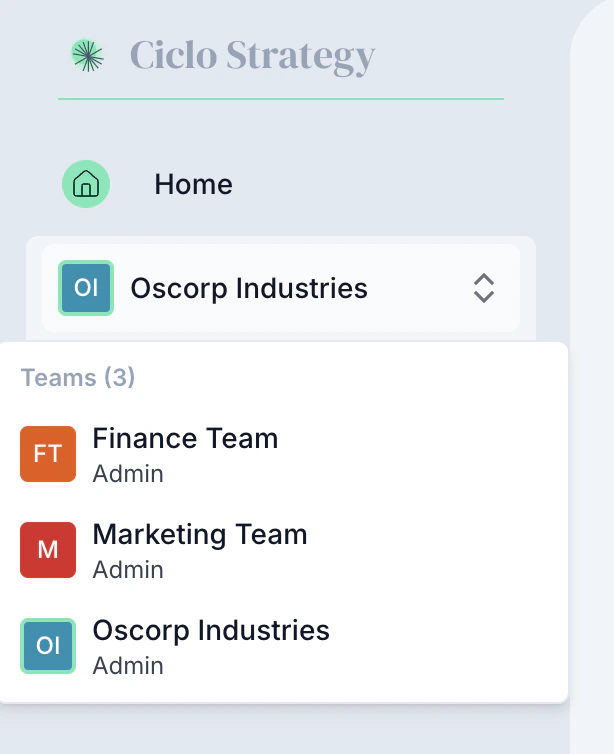
On the home page, use the team selector to choose the team you’re working on (for
example, “Finance Team”). Each team has its own strategy, roadmap, KPIs, and actions.
Switch teams from the team selector
2
Open the Strategy page
Choose Strategy in the sidebar. A new team starts with a blank strategy — start
editing to open the panel of strategy elements.
The Strategy page brings every element together in one view
3
Write your vision
In the Vision section, describe where your team is headed. Stuck? Click the
information (i) icon for expert guidance on how to frame a strong vision.
4
Add a strategic goal
Move to Strategic Goals and enter one specific goal — e.g. “Make tax compliance an
easier, less resource-intensive process.” Be concrete about what you want to achieve.
5
Refine with AI
Use Refine next to any element to get AI suggestions and alternative wordings.
Apply one with a click to replace your draft.
AI suggests clearer, stronger wording
6
Run an AI analysis
Once you have a few elements, run the strategy analysis for an instant read on your
strategy’s health and three actionable improvements.
An instant AI read on your strategy's health
You don’t need a perfect strategy to start. Dive in with what you have — Ciclo’s guidance
and AI will help you improve it as you go.